When face verification fails
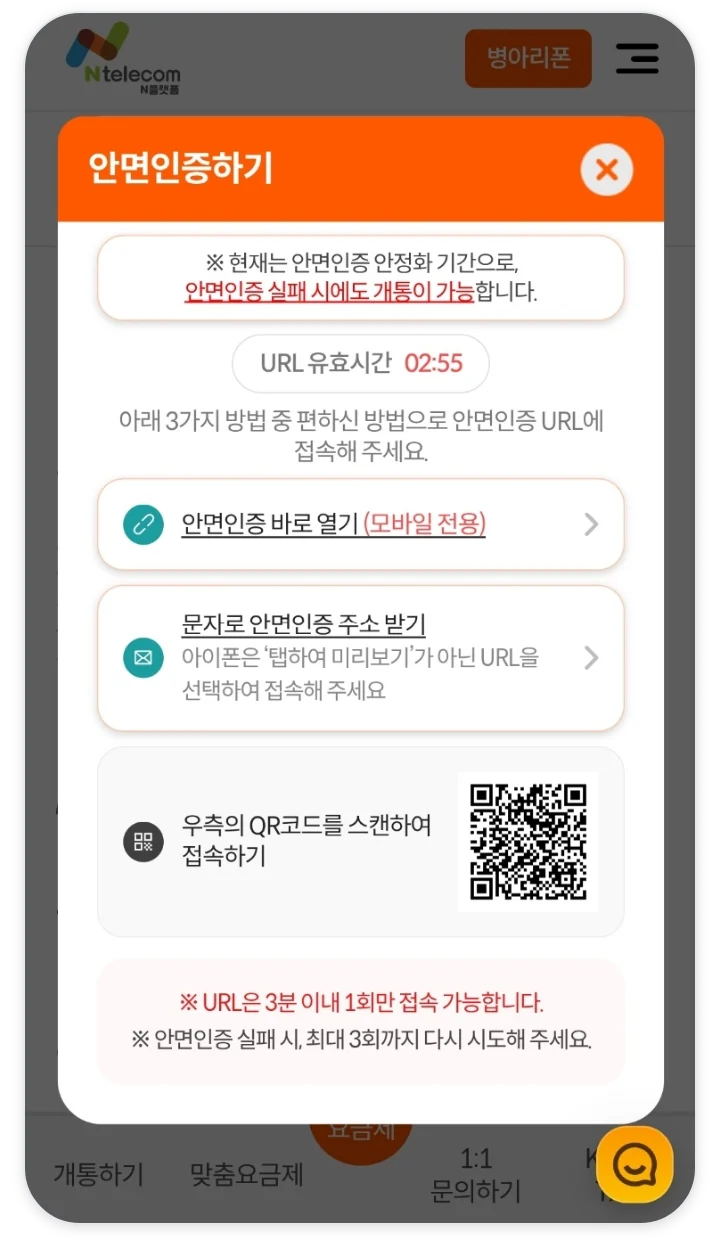
If face verification fails on a prepaid phone, try again in a bright place with your original ID. Even after three failures, you can continue with simple authentication.
Published Updated
- Verification method
- Open directly · text message · QR
- Verification link
- Once, within 3 minutes
- After 3 failures
- Next step
- Identity verification
- Simple authentication still applies
안면인증 오류 해결 방법 4가지 확인
2026년 11월 기준 안면인식 오류 해결 방법은 4가지입니다.
쓰고 있는 통신사의 PASS 앱 설치
알뜰폰은 쓰는 통신사(SKT·KT·LG U+)와 같은 PASS 앱을 받아요.
How do I retry if face verification fails?
Move to a bright place with your original ID, choose whichever of the 3 methods is easiest, and start again.
- Have your original ID readyStart with your original resident registration card or driver’s license in hand.
- Move to a bright placeLine up your face and ID in a bright place.
- Choose one methodChoose open directly, text message or QR, whichever is easiest.
- Start within 3 minutesThe link opens only once within 3 minutes. The time left is shown on the screen.
How should I set up the shot before trying again?
First check that your face is clear inside the on-screen frame. Fixing just the items below that apply can help on the next try.
| When | Try this |
|---|---|
| I am wearing glasses | If light reflects off the lenses, take them off |
| My bangs cover my face | Push them back so your forehead and eyebrows show |
| A window or light is behind me | Turn so the light comes from in front of your face |
| My face is too close or too far | Adjust the distance so your face fits the on-screen frame |
| I am wearing a mask or hat | Take it off so your whole face shows |
| My ID shows glare | Tilt the ID slightly to avoid reflected light |
These are tips for the shooting setup. If it still fails 3 times, tap “OK” in the pop-up to move to the next step.
What happens after 3 failures?
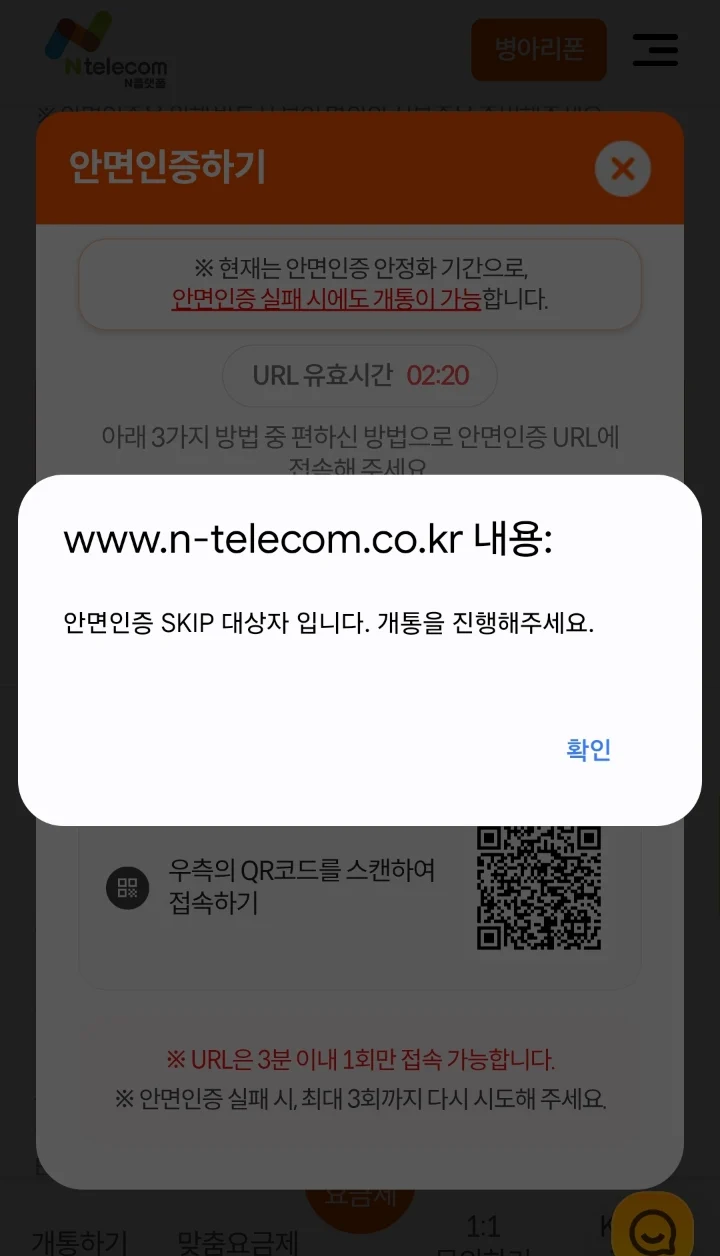
For now, a notice appears after 3 failures, and tapping “OK (확인)” takes you to the next step. Identity verification by simple authentication still applies.
- Check the noticeIn the notice that appears after 3 failures, tap “OK (확인)”.
- Simple authenticationVerify your identity with one of KakaoTalk, Toss Bank, PASS, KB Kookmin Bank or Shinhan Bank.
- Go to the next stepAfter identity verification, continue your application.
Based on the N-Telecom notice of September 30, 2026. Phase 2, under which a failed check means no activation, has been postponed. We will post the new date on this page once it is set.
Face verification FAQ
Why is face verification needed?
It is required under the government’s face verification program for activation. It applies to online activation, in-person activation and transfers of ownership.
Which ID do I use?
Korean nationals use a resident registration card or driver’s license.
How long does the face verification link stay open?
It opens only once within 3 minutes. The time left is shown on the screen, so start right after you get the link.
Does 3 failures mean I cannot activate?
Not for now. After 3 failures, tap “OK (확인)” in the notice to go to the next step, then verify your identity with simple authentication. This may change once Phase 2 takes effect.
Is there another check after face verification?
Yes. You complete simple authentication with one of KakaoTalk, Toss Bank, PASS, KB Kookmin Bank or Shinhan Bank.
What if I do not have a simple authentication certificate?
Online activation requires a simple authentication certificate. Without one, we guide you to in-person activation.
Written by Chickphone (N-Telecom dealer) · Based on N-Telecom information as of November 9, 2026 · View pre-approval certificate
Stuck somewhere else?
- When the SIM is not recognizedPower, airplane mode, then another phone
- When a subscription block is onRemove it via M-Safer, apps or carrier stores
- When the porting text doesn’t arriveAfter 10 minutes, consent by ARS call
- Why online activation failedReapply by reason
- See all problemsIncluding SIM number entry and top-up issues